 pet the cat
scp via cat.
NekoRun is a tiny macOS menu-bar utility that uploads whatever you drop on it — by scp over SSH, or to an smb:// share. That's it. That's the whole app.
 Download NekoRun.dmg
Try it (no cat required)
Drag the file onto the cat.
This is roughly what using NekoRun feels like, minus the part where the file actually goes somewhere. You can also drag real files in from your desktop — several at once, even. We promise they stay on your computer.
drag the file onto the cat
(or tap the cat, if you're on a phone)
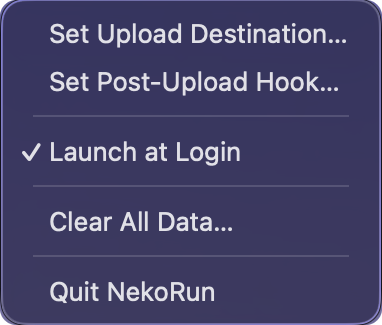
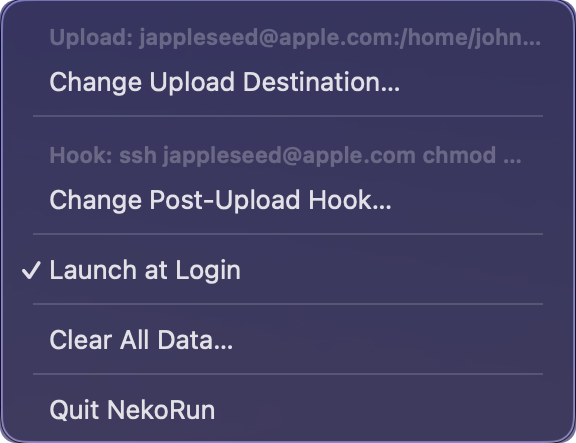
The entire interface
The whole app is one menu.
No window. No dock icon. No preferences screen. You click the cat in your menu bar and get exactly this — empty the day you install it, and it quietly remembers your destination and hook once you've set them.
How it works
Three steps. Two of them are setup.
Tell it where
Click the cat → Set Upload Destination…, pick SSH or SMB, and point it at you@yourserver or an smb://server/share. It remembers.
Maybe add a hook
Optionally set a shell command that runs after every upload — chmod things, restart things, notify things.
Drop stuff on the cat
One file, a dozen files, whole folders — drop them all at once. The cat wiggles while the upload runs. That wiggle is the progress bar.
PSA — before first launch
macOS will side-eye the cat.
NekoRun is unsigned — there's no $99/year Apple developer certificate behind it, so the first time you open it, Gatekeeper blocks it with a scary warning. The app is fine; macOS just doesn't know it. The source is public if you'd like to check — or build it yourself. Any one of these lets the cat through:
Open Anyway
Double-click NekoRun and let macOS refuse — click Done, not “Move to Trash”. Then open System Settings → Privacy & Security, scroll to the bottom, and click Open Anyway. One password later, macOS never asks again.
Right-click → Open
Right-click (or Control-click) NekoRun.app in Applications and choose Open, then Open again in the dialog. The classic secret handshake.
De-quarantine it
Strip the quarantine flag and Gatekeeper stops asking entirely. Feels right for an scp app: